





Brand Portals are born in the Media Library — SeeCommerce
Manage content and publish on Brand Portals directly from SeeCommerce, with fewer errors and greater operational fluidity.
Summary:
Results achieved:
- −25% average publication cycle times(draft → approval → go-live).
- >80% of test participants report increased confidence and reduced stress in preparation.
Type of work:
Product functionality design (UX/UI)
Delivery:
“Brand Portals” function integrated into SeeCommerce's Media Library
Team:
Giacomo Dalia; Warda development team; CPO; client stakeholders (Vibram, Campagnolo, Fulcrum).
My role:
UX/UI Designer — defining the user flow, information architecture, and interfaces
Introduction
The need that gave rise to the project was not only about creating a new digital space but primarily about simplifying and centralising its management. Clients wanted the ability to publish and control their content without resorting to parallel tools.
The Media Library of SeeCommerce, already conceived as a unique place to store and organise assets, thus became the natural starting point for the Brand Portals.
From here, the idea of an extension that would allow opening up what was already managed internally, while maintaining continuity of tools and governance rules, developed.
Problem:
The initial management of the portals immediately showed partial changes, causing confusion and risk of errors.
Solution:
Introduce an asynchronous editing mode, allowing safe work and publishing only when all changes are approved.
Seamless integration
One of the first decisions was the placement of the new function. Placing it within the Media Library avoided redundancies and allowed users to navigate in a familiar environment.
The initial implementation included real-time updates, but this choice created a problem: the portals immediately displayed partial changes in progress, creating possible discrepancies in the visitor's experience. The solution was to introduce an asynchronous editing mode, allowing work in a reserved draft space: content can be uploaded, organised, and modified at leisure, without anything becoming visible to end users.
Only when the flow is complete and validated does the user decide to publish all changes together, ensuring consistency and reducing the risk of showing intermediate or incomplete versions.
Problem:
With large volumes of files, it was difficult to understand which content had been modified.
Solution:
Add graphic indicators to show if a file is new, modified, or deleted, accompanied by a dedicated filter.
Another challenge was traceability: with large volumes of files, it was complex to remember which elements had been updated and which remained unchanged. To tackle this obstacle, we introduced a simple visual language: graphic indicators that show at a glance whether content is new, modified, or deleted. This way, those working on the portals no longer need to sift through entire folders but can focus only on the elements that require attention.
To complete the experience, we added a dedicated filter that allows for quickly isolating changes and validating them before publication. Thus, content control became not only faster but also safer and less stressful.
How it works in practice
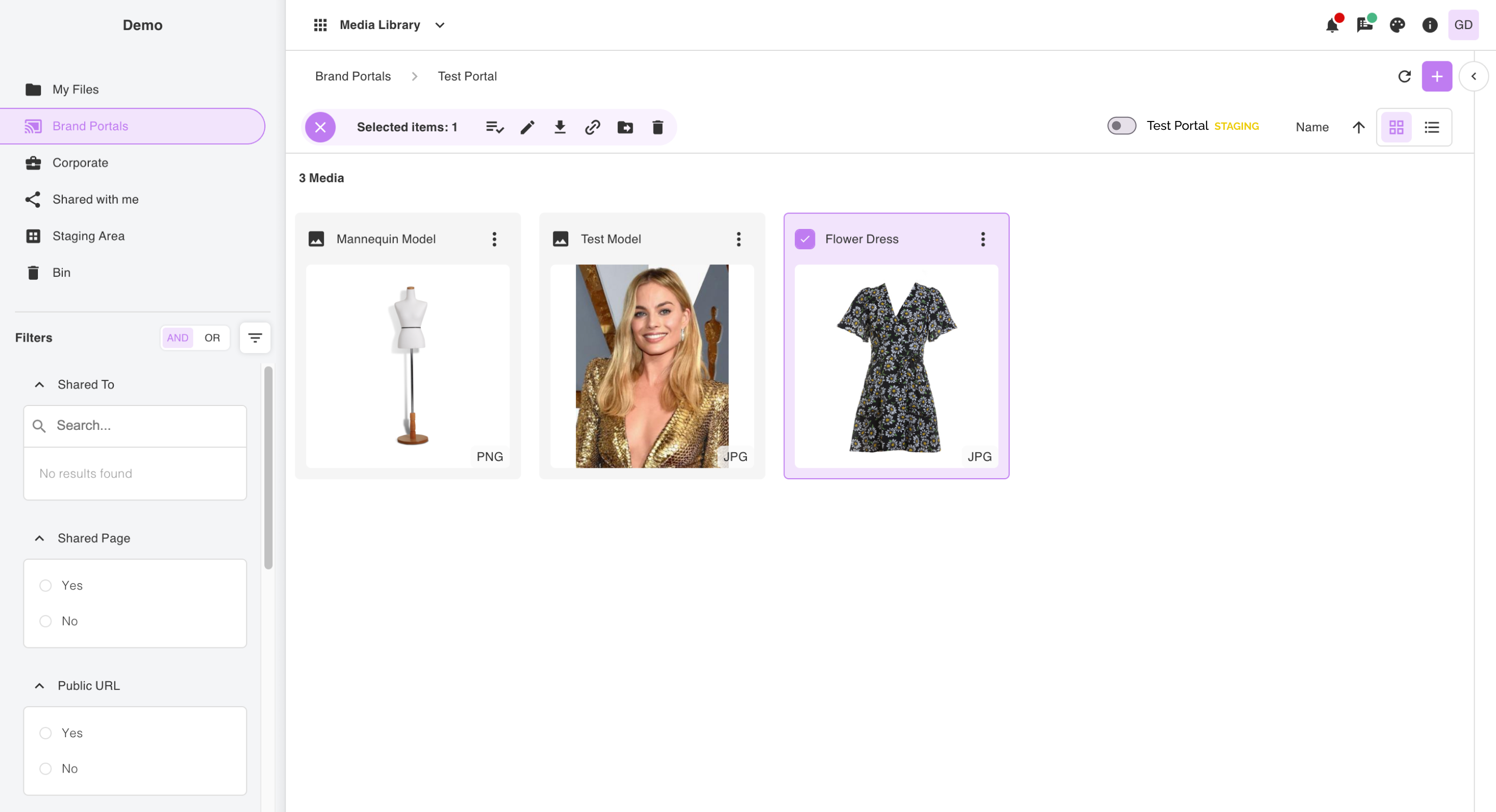
The experience has been designed to feel natural and immediate. Creating a portal was conceived as a familiar gesture: the user opens a new folder just as they do elsewhere in the Media Library and, with a simple step, decides whether to turn it into an active portal by linking it to the relevant external frontend. Once created, the portal can be assigned to individuals or groups with different permission levels, similar to common sharing systems. The population phase is equally intuitive: new files can be uploaded or drawn from those already archived in the Media Library, avoiding the need to duplicate content. This flow, which mirrors actions already familiar to users, has made the experience more natural and kept cognitive load very low, allowing those already accustomed to the platform to apply the new workflow effortlessly.
Observed results
With the release of the Brand Portals, teams began to work more smoothly, without resorting to parallel tools or makeshift solutions. The asynchronous mode significantly reduced errors due to premature publications, while the graphic statuses made quality control immediate, helping managers to approve changes from content moderators with greater confidence. The feedback collected — over 80% of users involved in the tests — highlighted not only a widespread feeling of increased confidence and less stress during preparation but also a concrete fact: average times to complete publication cycles were reduced by about 25% compared to the initial version lacking asynchronous publication.
Conclusion: a step forward in content management
Today, content is prepared once, organised, and published entirely within the Media Library. This has provided brands with a more reliable tool that simplifies daily work and reduces dispersion across different tools. Looking ahead, future developments will focus on more advanced management of asset versioning, allowing for the preservation of change histories and easy return to previous versions of a file.


Brand Portals are born in the Media Library — SeeCommerce
Manage content and publish on Brand Portals directly from SeeCommerce, with fewer errors and greater operational fluidity.
Summary:
Results achieved:
- −25% average publication cycle times(draft → approval → go-live).
- >80% of test participants report increased confidence and reduced stress in preparation.
Type of work:
Product functionality design (UX/UI)
Delivery:
“Brand Portals” function integrated into SeeCommerce's Media Library
Team:
Giacomo Dalia; Warda development team; CPO; client stakeholders (Vibram, Campagnolo, Fulcrum).
My role:
UX/UI Designer — defining the user flow, information architecture, and interfaces
Introduction
The need that gave rise to the project was not only about creating a new digital space but primarily about simplifying and centralising its management. Clients wanted the ability to publish and control their content without resorting to parallel tools.
The Media Library of SeeCommerce, already conceived as a unique place to store and organise assets, thus became the natural starting point for the Brand Portals.
From here, the idea of an extension that would allow opening up what was already managed internally, while maintaining continuity of tools and governance rules, developed.
Problem:
The initial management of the portals immediately showed partial changes, causing confusion and risk of errors.
Solution:
Introduce an asynchronous editing mode, allowing safe work and publishing only when all changes are approved.
Seamless integration
One of the first decisions was the placement of the new function. Placing it within the Media Library avoided redundancies and allowed users to navigate in a familiar environment.
The initial implementation included real-time updates, but this choice created a problem: the portals immediately displayed partial changes in progress, creating possible discrepancies in the visitor's experience. The solution was to introduce an asynchronous editing mode, allowing work in a reserved draft space: content can be uploaded, organised, and modified at leisure, without anything becoming visible to end users.
Only when the flow is complete and validated does the user decide to publish all changes together, ensuring consistency and reducing the risk of showing intermediate or incomplete versions.
Problem:
With large volumes of files, it was difficult to understand which content had been modified.
Solution:
Add graphic indicators to show if a file is new, modified, or deleted, accompanied by a dedicated filter.
Another challenge was traceability: with large volumes of files, it was complex to remember which elements had been updated and which remained unchanged. To tackle this obstacle, we introduced a simple visual language: graphic indicators that show at a glance whether content is new, modified, or deleted. This way, those working on the portals no longer need to sift through entire folders but can focus only on the elements that require attention.
To complete the experience, we added a dedicated filter that allows for quickly isolating changes and validating them before publication. Thus, content control became not only faster but also safer and less stressful.
How it works in practice
The experience has been designed to feel natural and immediate. Creating a portal was conceived as a familiar gesture: the user opens a new folder just as they do elsewhere in the Media Library and, with a simple step, decides whether to turn it into an active portal by linking it to the relevant external frontend. Once created, the portal can be assigned to individuals or groups with different permission levels, similar to common sharing systems. The population phase is equally intuitive: new files can be uploaded or drawn from those already archived in the Media Library, avoiding the need to duplicate content. This flow, which mirrors actions already familiar to users, has made the experience more natural and kept cognitive load very low, allowing those already accustomed to the platform to apply the new workflow effortlessly.
Observed results
With the release of the Brand Portals, teams began to work more smoothly, without resorting to parallel tools or makeshift solutions. The asynchronous mode significantly reduced errors due to premature publications, while the graphic statuses made quality control immediate, helping managers to approve changes from content moderators with greater confidence. The feedback collected — over 80% of users involved in the tests — highlighted not only a widespread feeling of increased confidence and less stress during preparation but also a concrete fact: average times to complete publication cycles were reduced by about 25% compared to the initial version lacking asynchronous publication.
Conclusion: a step forward in content management
Today, content is prepared once, organised, and published entirely within the Media Library. This has provided brands with a more reliable tool that simplifies daily work and reduces dispersion across different tools. Looking ahead, future developments will focus on more advanced management of asset versioning, allowing for the preservation of change histories and easy return to previous versions of a file.

Brand Portals are born in the Media Library — SeeCommerce
Manage content and publish on Brand Portals directly from SeeCommerce, with fewer errors and greater operational fluidity.
Summary:
Results achieved:
- −25% average publication cycle times(draft → approval → go-live).
- >80% of test participants report increased confidence and reduced stress in preparation.
Type of work:
Product functionality design (UX/UI)
Delivery:
“Brand Portals” function integrated into SeeCommerce's Media Library
Team:
Giacomo Dalia; Warda development team; CPO; client stakeholders (Vibram, Campagnolo, Fulcrum).
My role:
UX/UI Designer — defining the user flow, information architecture, and interfaces
Introduction
The need that gave rise to the project was not only about creating a new digital space but primarily about simplifying and centralising its management. Clients wanted the ability to publish and control their content without resorting to parallel tools.
The Media Library of SeeCommerce, already conceived as a unique place to store and organise assets, thus became the natural starting point for the Brand Portals.
From here, the idea of an extension that would allow opening up what was already managed internally, while maintaining continuity of tools and governance rules, developed.
Problem:
The initial management of the portals immediately showed partial changes, causing confusion and risk of errors.
Solution:
Introduce an asynchronous editing mode, allowing safe work and publishing only when all changes are approved.
Seamless integration
One of the first decisions was the placement of the new function. Placing it within the Media Library avoided redundancies and allowed users to navigate in a familiar environment.
The initial implementation included real-time updates, but this choice created a problem: the portals immediately displayed partial changes in progress, creating possible discrepancies in the visitor's experience. The solution was to introduce an asynchronous editing mode, allowing work in a reserved draft space: content can be uploaded, organised, and modified at leisure, without anything becoming visible to end users.
Only when the flow is complete and validated does the user decide to publish all changes together, ensuring consistency and reducing the risk of showing intermediate or incomplete versions.
Problem:
With large volumes of files, it was difficult to understand which content had been modified.
Solution:
Add graphic indicators to show if a file is new, modified, or deleted, accompanied by a dedicated filter.
Another challenge was traceability: with large volumes of files, it was complex to remember which elements had been updated and which remained unchanged. To tackle this obstacle, we introduced a simple visual language: graphic indicators that show at a glance whether content is new, modified, or deleted. This way, those working on the portals no longer need to sift through entire folders but can focus only on the elements that require attention.
To complete the experience, we added a dedicated filter that allows for quickly isolating changes and validating them before publication. Thus, content control became not only faster but also safer and less stressful.
How it works in practice
The experience has been designed to feel natural and immediate. Creating a portal was conceived as a familiar gesture: the user opens a new folder just as they do elsewhere in the Media Library and, with a simple step, decides whether to turn it into an active portal by linking it to the relevant external frontend. Once created, the portal can be assigned to individuals or groups with different permission levels, similar to common sharing systems. The population phase is equally intuitive: new files can be uploaded or drawn from those already archived in the Media Library, avoiding the need to duplicate content. This flow, which mirrors actions already familiar to users, has made the experience more natural and kept cognitive load very low, allowing those already accustomed to the platform to apply the new workflow effortlessly.
Observed results
With the release of the Brand Portals, teams began to work more smoothly, without resorting to parallel tools or makeshift solutions. The asynchronous mode significantly reduced errors due to premature publications, while the graphic statuses made quality control immediate, helping managers to approve changes from content moderators with greater confidence. The feedback collected — over 80% of users involved in the tests — highlighted not only a widespread feeling of increased confidence and less stress during preparation but also a concrete fact: average times to complete publication cycles were reduced by about 25% compared to the initial version lacking asynchronous publication.
Conclusion: a step forward in content management
Today, content is prepared once, organised, and published entirely within the Media Library. This has provided brands with a more reliable tool that simplifies daily work and reduces dispersion across different tools. Looking ahead, future developments will focus on more advanced management of asset versioning, allowing for the preservation of change histories and easy return to previous versions of a file.